




Jump to content
View in the app

A better way to browse. Learn more.

Ayuda Excel

A full-screen app on your home screen with push notifications, badges and more.

To install this app on iOS and iPadOS
  1. Tap the Share icon in Safari
  2. Scroll the menu and tap Add to Home Screen.
  3. Tap Add in the top-right corner.
To install this app on Android
  1. Tap the 3-dot menu (⋮) in the top-right corner of the browser.
  2. Tap Add to Home screen or Install app.
  3. Confirm by tapping Install.

Tablero Ventas con Velocímetros 1.0.0

(0 reviews)

1 Screenshot

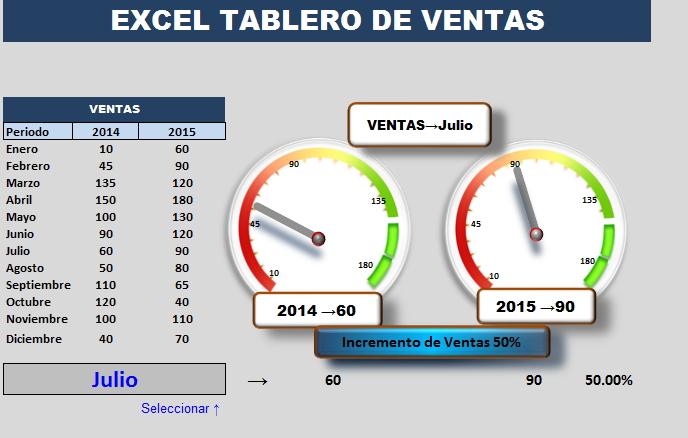
Ir a Hoja: Tablero aparecen Ventas de 2 años. Cada Velocímetro marca Ventas en Año relacionado y marca si hay Incremento de Ventas o Decrecimiento en Ventas 

Las Hojas c1 y c2 son la Bese de cálculo para construir los Velocímetros. Al seleccionar un mes en celda B21 se generan los resultados

Otras explicaciones en el Archivo

User Feedback

Create an account or sign in to leave a review

There are no reviews to display.

Configure browser push notifications

Chrome (Android)
  1. Tap the lock icon next to the address bar.
  2. Tap Permissions → Notifications.
  3. Adjust your preference.
Chrome (Desktop)
  1. Click the padlock icon in the address bar.
  2. Select Site settings.
  3. Find Notifications and adjust your preference.